Querying the YSE_PZ Database
This is a quick overview for running queries against the YSE-PZ database.
Running Queries with SQL Explorer
YSE-PZ uses SQL Explorer
to allow users to query its database. The link http://127.0.0.1:8000/explorer allows users to see queries
from other users and write their own (links assume the default URL for running the server locally).
Please see additional documentation through the SQL Explorer link.
When writing a new query http://127.0.0.1:8000/explorer/new/, the show schema button provides a way to view each database table for YSE-PZ. However, because the YSE-PZ model is complex, and we summarize the most useful transient tables below.
The YSE-PZ Data Model
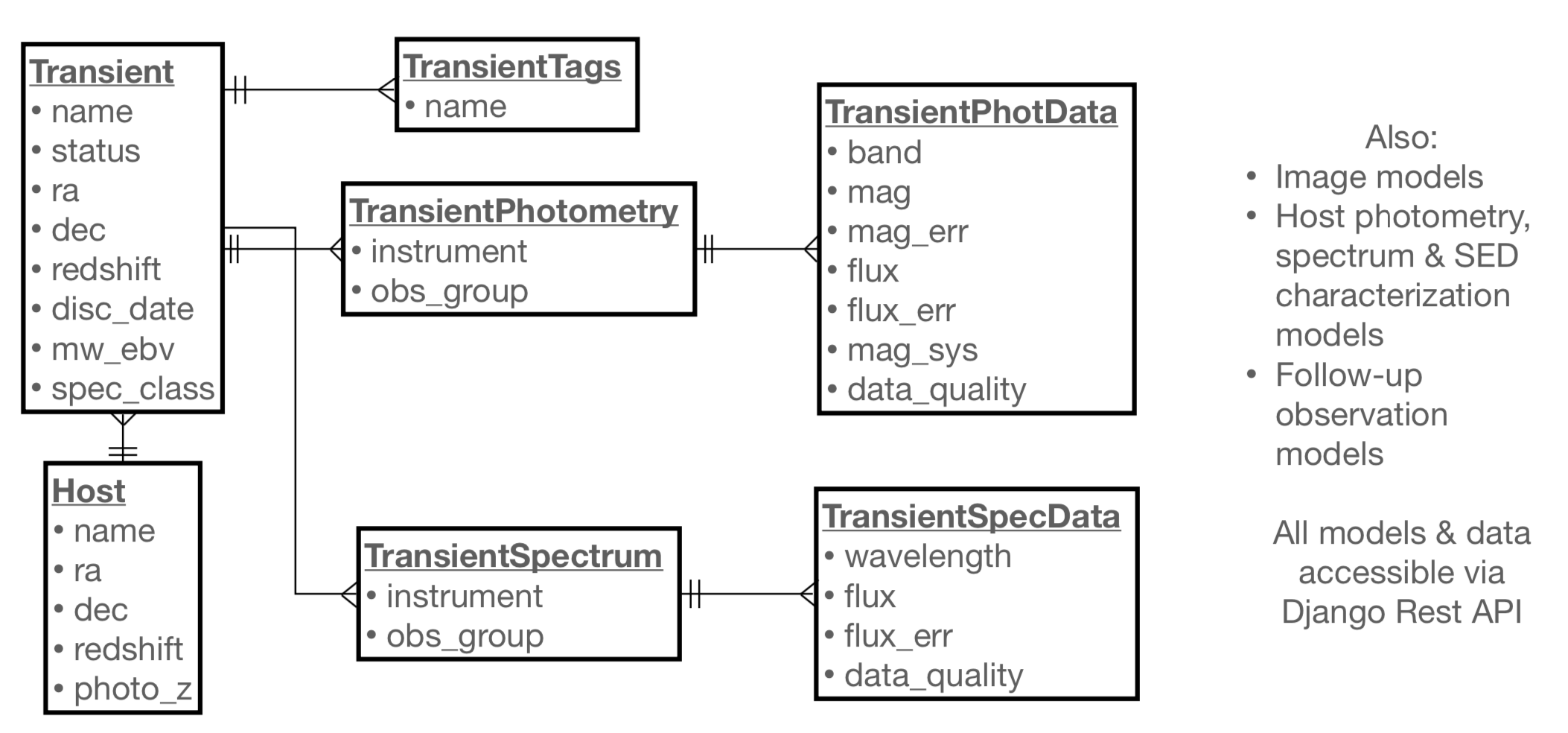
The central table for transient data in YSE-PZ is the YSE_App_transient table,
which in turn is connected to a tags model, a Host model, and TransientPhotometry and
TransientSpectrum models (photometry and spectrum models for host galaxies also exist).
These relationships are summarized below. The TransientTags model exists
such that YSE-PZ users can apply various tags to note attributes of objects that they are
interested in through the Detail Pages.
Writing Simple Database Queries
A few example queries are provided here: Example SQL Queries for YSE-PZ. These examples demonstrate common use cases as well as the relationships between the various database tables.
Writing Python-Based Queries on the YSE-PZ backend
Occasionally, writing queries in raw SQL can be much more
difficult than using Django’s python-SQL interface (especially
for Astronomers!). For these cases, users familiar with django
can add tagged queries to the YSE_App/queries/yse_python_queries.py
by writing a function using the @python_query_reg decorator.
Each function should return a Django “queryset” object. A brief example
of two of the queries above in Django/Python language is below.
Every spectroscopically classified SN Ia in the last 30 days:
@python_query_reg
def recent_spec_class():
    qs = Transient.objects.filter(Q(disc_date__gt=datetime.datetime.now()-datetime.timedelta(days=30)) &
                                  Q(TNS_spec_class='SN Ia'))
    return qs
Every SN that was brighter than 18th mag in the last week:
from django.db.models import Count, Value, Max, Min, F # useful aggregation methods

@python_query_reg
def recent_bright_mag():

    qs = Transient.objects.filter(~Q(transientphotometry=None))
    qs = qs.filter(Q(transientphotometry__transientphotdata__mag__lt=18) &
            Q(transientphotometry__transientphotdata__obs_date__gt=datetime.datetime.now()-datetime.timedelta(days=7)))

    qs2 = Transient.objects.filter(name__in=qs.values('name').distinct())

    return qs2
Adding Queries to a User’s Personal Dashboard
Queries can be added to a user’s “Personal Dashboard” located at the http://127.0.0.1:8000/personaldashboard link via the form at the bottom of the page. SQL queries created via the SQL Explorer can be selected with the left-hand dropdown menu and Python-based queries can be selected on the right-hand side (the title of the function is the name of the query). Queries can be removed via the trashcan button next to each query.