Sorting and Flagging New Transients
The primary purpose of YSE-PZ is to sort and follow new, scientifically valuable transients. There are many ways to use the infrastructure described in the documentation to do this, but here I describe a quick step-by-step guide to the triaging method we use at UCSC.
Checking the Follow-up Lists
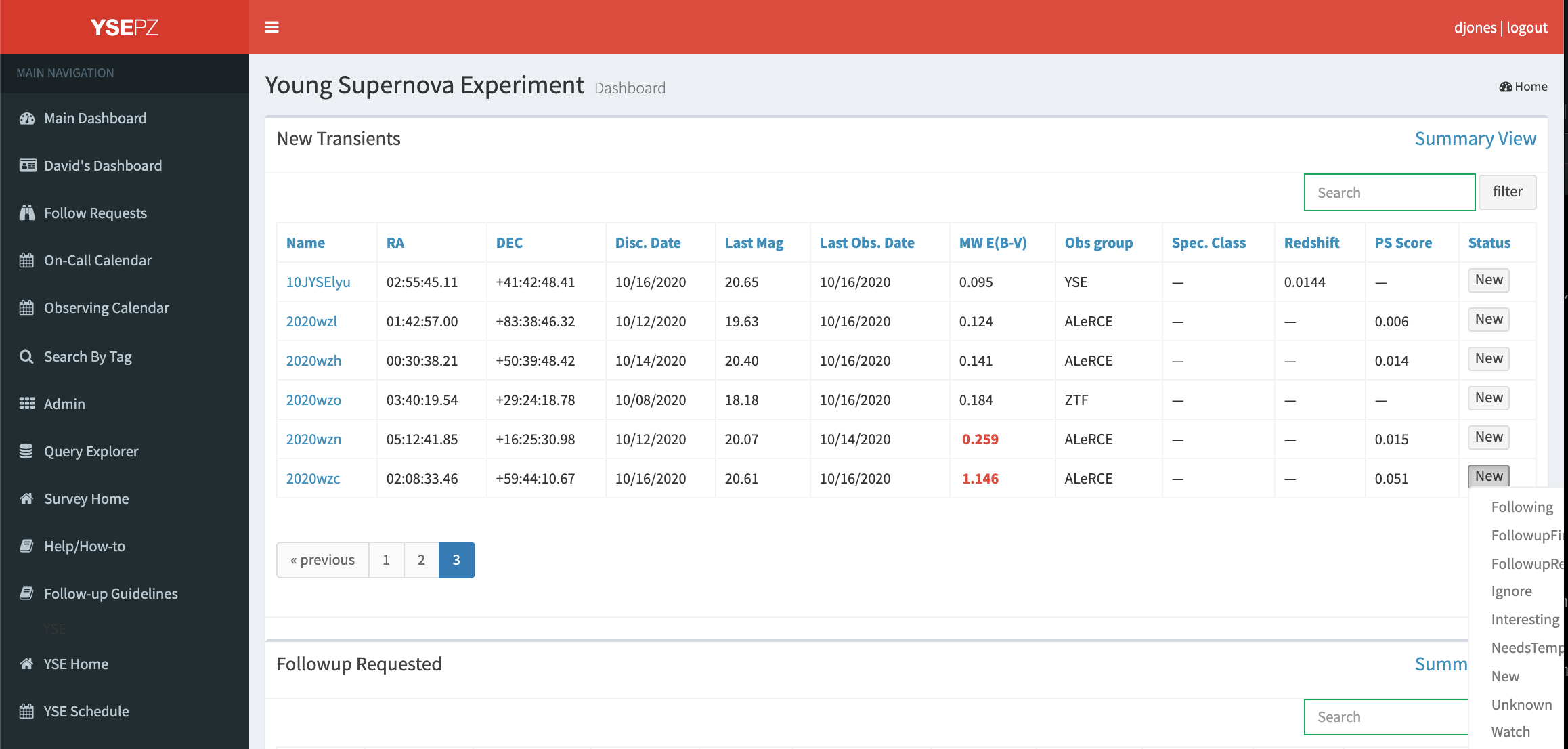
Start by refreshing the dashboard to ensure the latest transient data are available. Transients ingested from TNS or other sources, or newly classified transients, are automatically sent to “New”. “FollowupRequested” is used for transients where a team member has already requested an observation on a specific telescope. The “Following” list includes transients where our team has already obtained follow-up data. The “Watch” list includes transients that may be interesting but no additional observations have yet been requested. The “Interesting” list is similar to the “Watch” list but our team attempts to keep the list of “Interesting” objects to a manageable size so that they can be monitored daily for new developments. “FollowupFinished” and “NeedsTemplate” are for older sources.
First, look at the new data in the following list to check for new observations. Sorting by last observing data and going to the last page (or clicking the Last Obs. Date button twice to reverse sort) will give the most recent observations. Either the transient summary links or the detail links for individual objects will bring up pages that show any new data that exist. Objects rising, those with interesting classifications or spectra, or those that change their photometric or spectroscopic behavior in some way, might be candidates for additional follow-up observations. These can be requested through the Follow-up tab.
Checking the Watch List
Next, follow the same procedure for the Watch list. If follow-up data are desired, those can be requested through the Follow-up tab in the detail pages. If no follow-up observations will be requested by any team member, we recommend moving the object to “Ignore” where it will no longer show up on the dashboard but can still be found through SQL queries and by going to the detail page link, e.g. http://127.0.0.1:8000/transient_detail/1987A/, directly. Judgements on which transients are of interest or not depend on individual science cases, but generically unclassified, rising, bright transients are typically of particular interest to our team.
Checking the New List
Finally, sort through the New list, which consists of objects that have likely not been inspected by any team member. Initially, sorting by “PS Score” or point source score - this uses a catalog of Pan-STARRS sources that have gone through a machine learning classification to determine if the source is extended or not. Sources with a high PS Score are likely variable stars, especially if the reddening (MW E(B-V) column) is high. Sources such as these can be immediately moved to “Ignore”, but note that there are still real SNe discovered in galaxies with high PS scores. Old SNe and SNe with high reddening are also generally good candidates for moving to “Ignore”.
Next, sort the New list by magnitude and inspect bright sources by opening the detail pages by clicking on each object name. The archival images of the field from SDSS and Pan-STARRS can help by identifying if the transient is near a host galaxy; if not, it may more likely be an orphan, asteroid, stellar outburst or some other artifact that can be moved to ignore. We often go down to sources with mag ~18.5 for these detailed inspections. Sources near galaxies, even if they only have a single detection, are usually moved to “Watch”. For members of a certain group, sorting by “Obs Group” can also be helpful to inspect discoveries of particular interest.